
5 (Mostly) Free Apps to Scan Negatives With Your Phone

By: Elizabeth O'Neal (Heart of the Family)
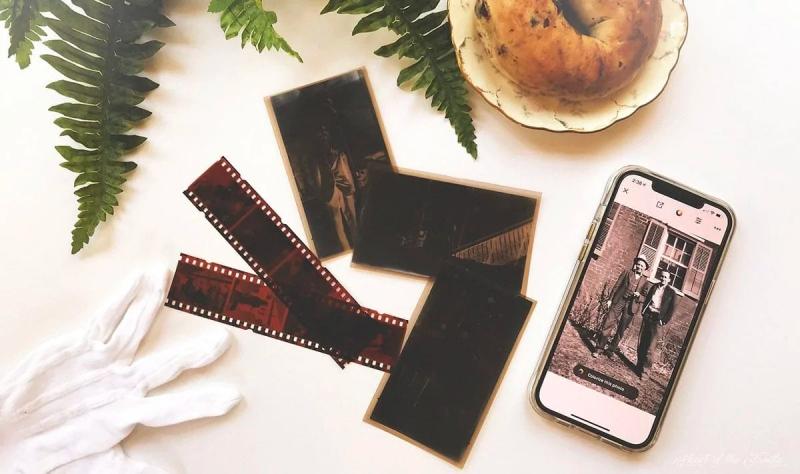

Digital photography may have orphaned those film negatives stored in shoe boxes but they're still memories that shouldn't disappear. Film scanning using a smartphone has been around quite a while and this review is rather dated. Some of the software may not be available any longer.
 S E E D E D C O N T E N T
A few years ago, I purchased a box of old family photos, letters, and other ephemera from a seller on eBay. Included in the box were about 65 black and white negatives from what looked like 116 or 616 films that were likely taken in the early 1930s. Several of the negatives were stuck together and decaying. I was determined to scan these negatives while I could still get a decent image.
Thankfully, we no longer have to go to the trouble or expense of taking film negatives to a camera store to be developed. We don't even need a flatbed scanner to digitize them. It's quick, easy, and inexpensive to scan negatives with your phone!
How I Scanned the Negatives for This Review
In this post, I have reviewed five different apps for scanning film negatives. For consistency, I used the same process and equipment to test each of the five scanning apps.
- The mobile phone I used was an iPhone 12 Pro Max.
- I built my own scanning "rig" out of a shoebox, an iPad, a piece of glass from an old picture frame, a few books, and a gooseneck tablet/phone holder from Amazon. You can find out how I did it in this post.
I also used the same film negatives to test each of the apps.
- The black and white 116 (or 616?) film negative was from the eBay box and is probably about 80+ years old. The image was slightly blurry, as were most of the images in the bunch, but I selected it because the negative itself had minimal physical damage (read: nothing sticky).
- The 35mm color negative of my grandmother and me was taken c. 1999 and had no visible physical damage. A digitized version of the original print image is shown below.
Original color print image of my grandmother, Maura McGraw Evans, and me (c. 1999), taken with a 35 mm digital camera. The print was photographed using an iPhone 12 Pro Max's native camera app with no editing other than to crop and straighten. The print image is somewhat yellowed from age; a slight camera reflection is visible in this digitized version.
None of the images in this post have been "Photoshopped," although a few were lightly edited using tools provided in the apps. Images may also have been straightened and cropped.
5 Apps to Scan Negatives with Your Phone
The following are five apps that provided the best results in my review.
These apps were selected for the following reasons:
- All are free to try. Even the apps requiring a subscription will let you snap a limited number of test shots.
- They are easy to use.
- They scan black and white as well as color negatives. Some even scan "positives," which is a term used to describe print photographs or images that are not inverted to a negative.
- They all gave reasonably good results… although some were better than others.
Ready to scan some negatives with your phone? Let's get started!
Filmory - Analog Film Scanner
Black and white negative scanned with the Filmory app.
Like
- Scans negatives and positives
- Filters and editing tools included
- Easily share to social media, etc.
Dislike
- No live preview
- Low-resolution scans
- Only 12 scans in the free version.
- Only for iOS devices
The Filmory - Analog Film Scanner app scans black and white and color negatives, as well as positives. The app is currently only for iOS devices.
Filmory is free to use for the first 12 scans; a counter is conveniently located next to the scan button to help you keep track of your usage. For unlimited scans, and to unlock all features, a Premium subscription is required: $2.99/month or $19.99/year.
Side note: If you need a free backlight, head to the Filmory website and click the Backlight link for a blank white screen to use while scanning your negatives. Be sure to turn up the brightness of your monitor for the best results. You can also access the backlight link from within the Filmory app.
What I Like
The app is simple to use, and it produces nice results. I was particularly impressed with the quality of the color scans.
Simple editing tools are provided, such as flipping horizontally or vertically, cropping, and rotating. There are also a variety of filters to use for making quick color adjustments, and most of these are available to try in the free version.
Color negative scanned with the Filmory app. The image was lightly edited in-app. Note how clearly you can now see the background, which was not visible in the print version.
Scanned images can be easily exported to your photo roll, as well as to a text message, email, Instagram, and other social media platforms. They can also be sent directly to photo editing software on your device.
What I Dislike
The images produced with this app were low-resolution. If you want to print any of your scanned negatives, this is probably not the app to use.
My biggest beef with this app is that there is no live preview of your negative scan. Instead, the preview appears in a dark sepia, making it difficult to compose the shot.
Live preview of a black and white negative being scanned with the Filmory app.
You could try going into Settings > Accessibility > Display & Text Size to invert the colors (Smart Invert or Classic Invert) or add color filters to try to create a live color preview. Personally, I think that's a bit too much work to do for an app in this price range.
Film Scanner Pro
Black and white negative scanned with the Film Scanner Pro app.
Like
- Free (buy additional filters for $7.99)
- Basic editing tools included
Dislike
- No live preview
- Low-resolution scans
- Only for iOS devices
If you're looking for an easy-to-use app without a bunch of bells and whistles, then Film Scanner Pro may be the one for you. It is a straightforward app designed to scan black and white and color negatives.
Film Scanner Pro is completely free to use. There is no subscription plan and no limit to the number of scans you can make.
What I Like
A few basic editing tools are built into the app, such as rotating and cropping to specific dimensions (i.e., 4:5, 16:9, etc.), and there are sliders for adjusting the exposure and contrast. For $7.99, you can purchase additional sliders to adjust the highlights and shadows, as well.
Finished scans are automatically saved to your phone's camera roll - instead of within the app - so there's no need to export them when you're finished.
What I Dislike
Like the Filmory app, Film Scanner Pro does not show a live preview of your scan. I wasn't even sure the app was working since all I could see was the negative image. You will not see the finished product until after you press the scan button.
Film Scanner Pro preview of a black and white negative scan.
Film Scanner Pro produced the lowest-resolution scanned images of the five apps reviewed in this post. The full-screen black and white negative image was only 185 KB, while the color negative image was a meager 45 KB.
Color negative scanned with the Film Scanner Pro app. This is a full-size image.
As you can see, my color scan looks nothing like the sample images shown in the App Store. My image not only turned out tiny and blurry - which isn't surprising considering the resolution - but it also had too much cyan.
FilmBox by Photomyne (free version)
Black and white negative scanned with the Filmbox by Photomyne app.
Pros
- Nice results for both B&W and color negatives
- Edit, colorize, and share images from within the app
- Voice control - say "go" to scan
- Available for iOS and Android
Cons
- Automatic cropping is irritating
- Limited free account; must purchase a subscription for unlimited scans and other features
FilmBox is one of a suite of apps by Photomyne, Ltd. Probably most well-known for its photo scanning app, Photomyne also offers apps for scanning slides, colorizing black and white images, creating slideshows, and more.
As with all Photomyne apps, FilmBox is free to download, and it includes a few basic options to try. Although I've been unable to find confirmation of this anywhere, it appears that you can make up to 15 scans with the free version.
For unlimited scanning, you will need to sign up for a subscription. A FilmBox unlimited subscription costs $7.99 a month, $29.99 for a one-year subscription, or $39.99 for a two-year subscription (other fees may also apply).
I know that sounds like a lot of money for an app, but if you have a lot of negatives to scan, and you would like the convenience of accessing your scans across devices, then the cost of a subscription might be worth it for you.
IMPORTANT NOTE: To use the free version, tap the X in the top left corner when you open the app. Don't click the red Continue button unless you want to purchase a subscription.
What I Like
The FilmBox app did a nice job of scanning both test negatives. In fact, of all the apps reviewed here, I thought FilmBox delivered the truest color result when compared to the print version.
Color negative scanned by Filmbox, lightly edited in-app. The weird line over my nose is a reflection of the iPhone's camera lens (which I didn't notice until later - oops).
A few simple editing features are available in the free version: rotate, crop, and flip horizontally (which is helpful if you scanned an image on the wrong side). Several 1-click enhancements are available to adjust the color and contrast of your scanned images.
If you want to colorize your black-and-white images, you can do so from within the FilmBox app. I thought the app did a decent job of colorizing my black-and-white images, and one image (not pictured here) was stunning. That said, the results are similar to what you'll get from MyHeritage in Color, and results will vary based on the quality of your scanned image.
Black and white image that has been colorized with the Filmbox app.
I also liked FilmBox's voice-activated shutter. If you have shaky hands like I do, you will appreciate being able to just say "go" to snap a scan, preventing additional blur caused by camera shake.
Finally, Filmbox provides a live preview of your scan so you can see what you're going to get. This is especially helpful if you're using the free version since you only get 15 scans, and you won't want to waste them.
What I Dislike
FilmBox automatically crops your images when it scans, and this feature drove me absolutely bonkers. I wasted 3 of my free scans before I figured out what was happening.
Filmbox preview of a black and white negative scan.
Based on reviews in the App Store and Google Play, this is a common complaint. According to the developer's response, "The camera needs to see the side holes in order to have the best automatic cropping." Since older negatives don't have side holes, automatic cropping can make using FilmBox a bit tricky to use.
Automatic cropping also caused a few of my images to appear "warped" when the app couldn't find the edge of the negative (and sometimes, even when it could). A couple of images looked like they were inspired by a Salvador Dali painting.
I think it would be very helpful to have an option to turn off the auto-cropping feature. If such an option exists, I couldn't find it.
FilmLab: Negative Film Scanner
Black and white negative scanned with the FilmLab app.
Pros
- Scans negatives and positives
- Live preview of your scan
- Available for iOS and Android
Cons
- Only 12 free scans before you need to purchase a subscription.
- Disappointing results for positives and color negatives
FilmLab: Negative Film Scanner is a simple app for scanning film negatives and positives. It is available for both iOS and Android devices.
When you install FilmLab, you will get 12 free scans per device. After that, you will need to purchase a subscription for $4.99/month or $34.99/year.
FilmLab also offers desktop software for Windows and Mac that will take your scanned negative images and convert them to positives. This could be useful if you have already scanned your negatives with a scanner or camera, and you still need to convert them to positives. This software is not free, and I have not tested it.
What I Like
The FilmLab app is easy to use: simply select your image type (b&w negative, color negative, or positive), choose a focus distance (.5, 1x, or 2x), and press the white button to capture the image. There is also an option to change your sync speed from 1/50 to 1/60; however, I did not see any difference in the quality of my scans when I changed the sync speed.
A live preview of your scan is available so you can see what the final image will look like.
A few basic editing tools are available in-app: you can adjust the exposure, color temperature, and contrast, as well as crop your images. Images can then be saved to your camera roll or shared directly from the FilmLab app to other apps, text messages, or a variety of social media platforms.
Editing tools in the FilmLab app.
I thought this app did a decent job of scanning black-and-white negatives.
RELATED:10 Historical Clothing Retailers for the Perfect Reenactment, LARP, or Party Outfit
What I Dislike
My color-negative scans were blurry and grainy and looked nothing like the sample images on the FilmLab website. Getting closer to the negative itself didn't help, and the results weren't any better when I zoomed to 2x.
Color negative scanned with the FilmLab app.
Positive image scans were difficult to make because the exposure and color temperature changed whenever the camera was moved. Natural light worked in some cases, but not always.
Plus, twelve scans aren't enough to decide if you want to pay for what is a fairly pricey subscription.
Kodak Mobile Film Scanner
Black and white negative scanned with the Kodak Mobile Film Scanner app.
Pros
- Completely free to use
- Scans negatives and positives
- Live preview of your scan
- High-resolution images
- Lots of editing tools included
- Available for iOS and Android
Cons
- Disappointing results for color scans
The Kodak Mobile Film Scanner app is, of course, created by the photo-industry-icon Kodak. This app is completely free to use, with no limit to the number of scans you can make, and it is available for both iOS and Android devices.
What I didn't know when I started scanning is that the app is meant to be used with the physical Kodak Mobile Film Scanner, which is a mini LED lightbox in a hard cardboard stand for your phone to perch upon. If you don't want to build your own lightbox, as I did, this may be a good option for you (the Amazon reviews are mostly positive). I haven't tried it, though.
What I like
For a completely free app, the Kodak Mobile Film Scanner is loaded with features. In my opinion, it gives you the most bang for the buck.
One feature in particular that I liked is the ability to make adjustments to a live preview. For black and white negatives, use the slider at the top of the screen to adjust image exposure. For color negatives and positives, the slider adjusts the image's white balance or color temperature.
You can also bring the image into focus by tapping your phone's screen. This is particularly helpful for making close-up scans of a negative, though the image tends to blur again if you try to get closer than 4 inches.
Editing tools are available in the Kodak Mobile Film Scanner app.
The Kodak Mobile Film Scanner app is chock-full of editing features to use post-scan. Not only are there a few dozen Instagram-like filters for making quick fixes, but you can also crop (square or circular), vignette, add rounded corners, and pixelate, as well as adjust the exposure, contrast, saturation, sharpness, and color temperature. You'll even find tools for drawing and adding text, stickers, and frames.
When you finish editing your scan, you can download the image to your photo roll and/or share it with other apps and social media. I did not see an option to send the image in a text message.
This app produced the highest-resolution images of all five apps in this test group. I was most impressed with the quality of the black-and-white scans.
What I Dislike
While the Kodak app did a great job on my 80-plus-year-old black-and-white negatives, the results of my color scans were disappointingly blurry and pixelated. I couldn't get much improvement by using the plethora of editing tools in the app.
Color negative scanned with the Kodak Mobile Film Scanner app.
My color scan might have been improved by using the Kodak Mobile Film Scanner box, but I can't vouch for that.
Summary of Results
After testing and using all five apps, here is a summary of what I learned:
- Kodak Mobile Film Scanner (app only, no box) did the best job of scanning my old black and white negatives. In fact, I liked it so much that I used it to scan all 65 of them. I especially appreciate the ability to adjust the exposure and focus before making a scan. For a completely free app, this one had the most bang for the buck.
- FilmBox by Photomyne did the best job on my color negatives. If I had a bunch of color negatives to scan (which I don't), I would most likely pay for a subscription.
- Editing tools need to be used before saving the scanned image. Only Filmbox by Photomyne lets you return to the app later to edit a scanned image.
- I wouldn't use any of these apps to scan positives. There are plenty of apps that are specifically designed for scanning photographs, and they do a better job.
- Poor-quality negatives produce poor-quality scans. You may need to do some post-scan work in Photoshop, VIVID-PIX, or other photo-editing software to achieve the best (or better) results.
Keep in mind that YMMV (your mileage may vary). I highly recommend taking each of these apps for a test drive before making your final selection.
Wrap Up
Scanning old film negatives with your phone is a simple and inexpensive process. Just download your preferred app, snap an image, and enjoy and share your new (old) photos!
Have you come into possession of old film negatives that you'd like to bring back to life? Do you have a favorite negative-scanning app that isn't on this list? Tell us in the comments!

Tags
Who is online
463 visitors
I use an android phone so I searched Google Play to see what was available.
, listed in the review, is still available.
, listed in the review, is still available.
In addition to the reviewed software, I found some other options. looks similar to the Kodak software. Another option is which is also free but, apparently, contains in-app advertising.
Both Kodak and Pictoscanner have apps for 6x6 format film, too.
good information