
This patch makes GIMP feel like Photoshop, and I love it

By: Yadullah Abidi (MUO)
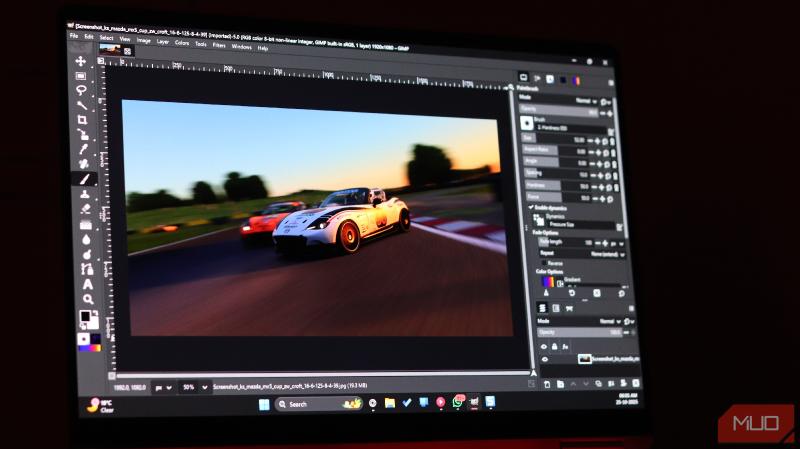

There are a number of image editing tools available (both paid and free). GIMP is one of the more powerful image editors that is free to download and use. (GIMP is an acronym that stands for GNU Image Manipulation Program.) As with any software that has a lot of features and capabilities there is a steep learning curve to become adept at using GIMP.
PhotoGIMP is an addon that rearranges the standard GIMP user interface into a less cluttered and easier to use format. As an added bonus the PhotoGIMP interface allows more screen space for images. While originally intended to help Photoshop users transition to GIMP, the addon can be a real boost for non-Photoshop users, too.
If you do more involved image editing or create digital art then GIMP is definitely worth a look. GIMP has been around long enough now that a large number of effects, filters, and addons are available.
 S E E D E D C O N T E N T
If you've ever tried switching from Photoshop to GIMP, you know the switch isn't as straightforward as it first seems. GIMP has its own interface and tools, and although it offers the same functionality as Photoshop, accessing and using those features is quite different.
There are plugins that make GIMP more powerful than Photoshop, but I found something better. This patch makes GIMP feel like Photoshop, and now it finally feels like a true Photoshop alternative.
What PhotoGIMP actually does
A simple tweak that makes GIMP feel instantly familiar to Photoshop users
I tried to love GIMP, but Photoshop wins me back, one of the main reasons being the interface. The default Photoshop interface is quite easy to get the hang of. All the tools and features are neatly categorized in a manner that you won't even think about which menu you're clicking after following a couple of tutorials.
Yadullah Abidi / MakeUseOfCredit: Yadullah Abidi / MakeUseOf
Yes, you can customize GIMP's interface. In fact, it's one of the areas where GIMP outperforms Photoshop in my opinion. However, if you're a hardcore Photoshop user, the customization isn't quite going to make GIMP a Photoshop replica. You'll still have to abandon years of muscle memory and develop new workflows.
This is where PhotoGIMP comes in. It's a free, open-source customization patch that transforms GIMP's interface to closely mimic Photoshop. It's not a separate application, just a configuration overlay to replace GIMP's default settings.
Yadullah Abidi / MakeUseOfCredit: Yadullah Abidi / MakeUseOf
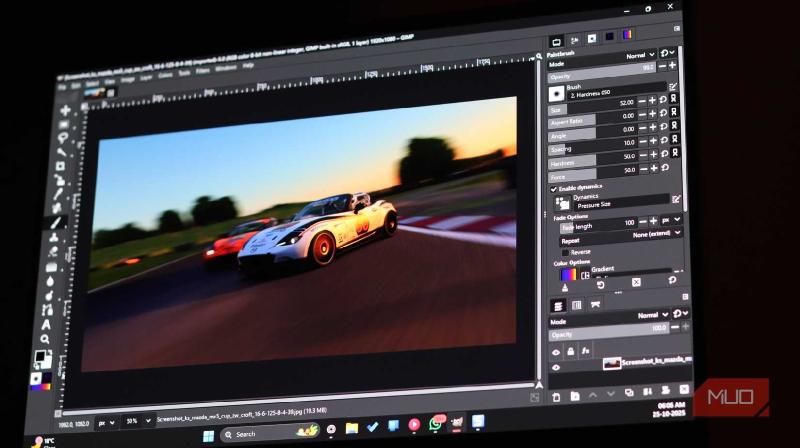
Apart from reorganizing the entire interface to match Photoshop's layout, the patch also condenses the toolbox into a single-column step, with tools positioned where you'd expect them in Photoshop. It also applies a symbolic icon theme, which is essentially single-color icons similar to what Photoshop uses. This gives GIMP a much cleaner and more modern look.
PhotoGIMP also remaps all of GIMP's default shortcuts to match Photoshop's keybindings. This means that Ctrl + T for transform, Ctrl + D for deselection, and all the other shortcuts you've burned into your brain over years of using Photoshop work right away. No need to erase years of muscle memory and relearn new shortcuts.
Keep in mind that PhotoGIMP doesn't actually modify GIMP's core functionality. All the features, plugin support, and image processing capabilities remain exactly the same. PhotoGIMP only changes how everything is presented and accessed.
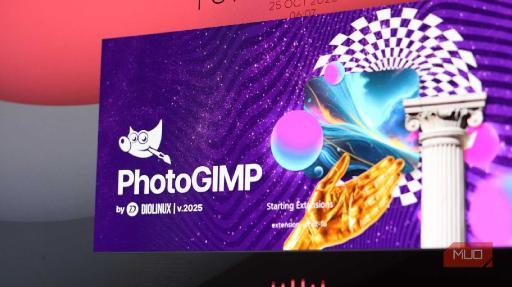
The patch also includes a custom splash screen and an optional desktop icon. It's a small touch, but it helps to differentiate your PhotoGIMP setup from the standard GIMP in case you want to use both together.
Installing PhotoGIMP is refreshingly painless
You'll be up and running in minutes
Installing PhotoGIMP is quite easy and doesn't require any technical knowledge. The official GitHub repository for the patch has detailed instructions on how to install it for Windows, Linux, and macOS.
All you need to do is extract the ZIP archive for the patch and replace it with GIMP's configuration files in the appropriate directories as per your OS and installation path. On Windows 11, this requires the following steps:
- Extract the PhotoGIMP.zip archive and copy the 3.0 folder.
- Press Windows Key + R to open the Run prompt. Type %APPDATA%\GIMP and press Enter.
- Paste the 3.0 folder you copied previously inside the GIMP folder that you just opened. Select Replace the files in the destination when prompted about existing files.
- Restart GIMP for the changes to take effect.
If you want to back up your GIMP configuration before applying the PhotoGIMP patch, make sure to copy the entire GIMP folder copy the entire 3.0 folder from %APPDATA%\GIMP to a safe location. Note that the folder location varies between OSes.
Keep in mind that you need to start and quit GIMP at least once after installing it for the patch to work. Other than that, replacing the stock GIMP configuration files with PhotoGIMP is the only installation step. Going back to the default GIMP interface is as easy as deleting the patch files and folders from the GIMP installation directory.
It won't magically make GIMP better
PhotoGIMP can't overhaul GIMP's quirks, but it does smooth out the rough edges
Since PhotoGIMP is mostly a cosmetic makeover for GIMP, it's not going to magically add features GIMP is missing or make it better than Photoshop than it already may or may not be for you. Photoshop's advanced selection tools, content-aware fill capabilities, AI features, and other workflows still remain exclusive.
What PhotoGIMP does is close the gap between the two programs significantly. Adobe has me locked down, and I hate it. This patch makes the switch easier in the sense that I didn't necessarily lose out on years of muscle memory and workflow efficiency I developed in Photoshop.
GIMP's core features work differently from Photoshop's, even if they're achieving the same results. There's still going to be a learning curve, but PhotoGIMP makes it a little easier for you to get going.
PhotoGIMP makes GIMP actually usable
This patch bridges the gap between open-source chaos and Photoshop polish
PhotoGIMP is perfect for anyone transitioning from Photoshop to GIMP, wanting to maintain productivity without spending weeks relearning muscle memory. If you're a designer, photographer, or digital artist who knows their way around Photoshop but needs a free alternative, it makes GIMP much more accessible.
However, if you're completely new to image editing and graphic design and haven't used Photoshop before, I'd recommend steering clear of it. The vanilla GIMP interface is still quite functional, and unless you have used Photoshop before, PhotoGIMP doesn't do much.
If you're on the fence about trying GIMP, or tried it before and came back because of the interface, PhotoGIMP is worth a shot. It won't turn GIMP into the perfect Photoshop clone, but it'll get it close enough that you might actually stick with it this time.
Be a good human. Grossly derogatory comments, blatantly inflammatory comments, excessive trolling, mean-spirited taunting and insults, scamming, spamming, and off topic comments may be removed in compliance with the site's Terms of Service and the Code of Conduct. The moderators have the final word.

For those who might be interested here is a link to the official GIMP site: The software is free and does not require any sort of registration. The site also includes documentation and tutorials.
There are number of tutorial videos available on YouTube, as well, that show the software's capabilities.
I installed it a few years back and learned some uses. I then realized it was more than I really needed so stopped using it. As far as free tools though I would say it is the most comprehensive I have seen. I will check out your patch though
The latest version 3 is a big improvement. PhotoGIMP helps clean up the user interface. But there's still a fairly steep learning curve to use the software to its full potential.
There are several new image editors available now. I haven't looked in Windows 11 to see what Microsoft has included.
Thanks for info. I will try it
I make my memes and doctored photos with paint.net. Its not sophisticated compared to some of these others, but I'm not trying to fool anyone.
I should look into GIMP though.
I've used Paint.NET. It's pretty easy to use and has all the commonly needed tools. For creating memes, using layers can be a game changer, though.
You can use layers on paint.net
I dont know how sophisticated they are, but they do have them
I didn't remember that. I don't currently have Paint.NET installed but may need to get it again.
That's a lot different than I remember. But I wasn't using version 5. I may have still been using version 3.
The Paint.NET I had installed was a lot easier to use and had some effects that weren't available anywhere else. Looks like I need to check it out again.
Thanks for the info!